

Quantization
What is Quantization?
Section titled “What is Quantization?”Quantization reduces the number of bits used to store and process model values.
An LLM stores many numbers.
These numbers are usually model weights and activations.
For example, a model can store a weight like: 0.23847
In FP32, this value uses 32 bits.
Quantization can store a similar value with fewer bits.
FP32 → 32 bitsFP16 → 16 bitsINT8 → 8 bitsINT4 → 4 bitsaim: Use fewer bits while keeping model quality close to the original.
Why Do We Need Quantization?
Section titled “Why Do We Need Quantization?”LLMs can have billions of parameters.
Each parameter needs memory.
For example, consider a model with 7 billion parameters.
for FP32
7B × 4 bytes≈ 28 GBFor FP 16
7B × 2 bytes≈ 14 GBNow use INT8:
7B × 1 byte≈ 7 GBNow use INT4:
7B × 0.5 byte≈ 3.5 GBSo quantization can greatly reduce memory use.
What Does a Bit Mean?
Section titled “What Does a Bit Mean?”A bit can store two values:
01More bits allow more possible values. A model with fewer bits has fewer possible values for each number.
This means quantization introduces an approximation.
Quantization Is Approximation
Section titled “Quantization Is Approximation”Suppose the original model has: 0.23847
A quantized model may not store this exact value.
It may store a smaller representation.
During computation, the system reconstructs an approximate value.
For example:
Original:0.23847
Quantized:0.24
Quantization trades some numerical precision for lower memory and faster computation.
How Does Quantization Work?
Section titled “How Does Quantization Work?”A simple quantization method maps many floating-point values to a smaller set of values.
Consider:
-1.0-0.8-0.6-0.4-0.2 0.0 0.2 0.4 0.6 0.8 1.0A quantizer may map these values to a smaller set of integer values.
The system also stores a scale. The scale helps convert the quantized value back to an approximate floating-point value.
Scale and Zero Point
Section titled “Scale and Zero Point”The scale tells us how large each quantized step is.
The zero point tells us which integer represents zero.
A simplified equation is:
quantized = round(float_value / scale) + zero_pointTo get an approximate original value:
float_value ≈ (quantized - zero_point) × scaleQuantization uses a smaller numerical representation plus metadata such as scale and zero point.
Weight Quantization
Section titled “Weight Quantization”One common approach is to quantize the model weights.
Original weights ↓Quantization ↓INT8 / INT4 weightsThis reduces:
- GPU memory usage
- CPU memory usage
- Model loading time
- Memory bandwidth requirements
Activation Quantization
Section titled “Activation Quantization”Weights are not the only values in an LLM. The model also produces activations during inference.
These values can also be quantized.
This can provide greater performance improvements. But activation quantization is usually more difficult, Because activations can have a wider and less predictable range.
A common approach for LLM inference is Weight-Only Quantization:
Weights are quantizedActivations are of higher precisionPTQ vs QAT
Section titled “PTQ vs QAT”Post-Training Quantization
Section titled “Post-Training Quantization”Train the model first. Quantize it later.
This is simple and common.
You do not need to retrain the model.
Quantization-Aware Training
Section titled “Quantization-Aware Training”Train the model while considering quantization.
Training ↓Simulate quantization ↓Adjust model ↓Quantized modelQAT can preserve accuracy better.
But it requires additional training work.
Quantization and Inference
Section titled “Quantization and Inference”Quantization can improve inference in several ways.
1. Smaller model
Section titled “1. Smaller model”The model needs less storage.
2. Lower GPU memory usage
Section titled “2. Lower GPU memory usage”More models can fit on the same GPU.
3. Lower memory bandwidth
Section titled “3. Lower memory bandwidth”Less data needs to move between memory and compute units.
4. Better hardware utilization
Section titled “4. Better hardware utilization”Some GPUs and CPUs have optimized low-precision operations.
5. Lower cost
Section titled “5. Lower cost”Smaller models can require fewer or smaller GPUs.
But quantization does not automatically make every model faster.
The hardware and inference engine must support the chosen format efficiently.
Important Quantization Methods
Section titled “Important Quantization Methods”As an AI Engineer, you will see several names.
A post-training quantization method.
It became popular for quantizing LLM weights to low precision.
Activation-aware Weight Quantization.
It focuses on protecting important weights based on activation information.
It is widely used for LLM inference.
SmoothQuant
Section titled “SmoothQuant”A method designed to make activation quantization easier.
It moves some of the difficulty from activations to weights.
bitsandbytes
Section titled “bitsandbytes”A popular library used for low-bit model loading and quantization.
GPTQ vs AWQ
Section titled “GPTQ vs AWQ”At a high level:
| Method | Main idea |
|---|---|
| GPTQ | Quantize weights after training |
| AWQ | Protect important weights using activation information |
| SmoothQuant | Make activation quantization easier |
| QAT | Train the model with quantization in mind |
You do not need to memorize the implementation details yet.
You should understand why these methods exist.
Quantization Formats
Section titled “Quantization Formats”Do not confuse a quantization method with a model file format.
For example: GPTQ and AWQ are quantization approaches.
You may also encounter formats such as: GGUF
GGUF is a model file format commonly used by the llama.cpp ecosystem.
A model can contain quantized weights in a specific format.
This distinction becomes important when you deploy local LLMs.
Quantization in the Production Stack
Section titled “Quantization in the Production Stack”Think about an inference system like this:
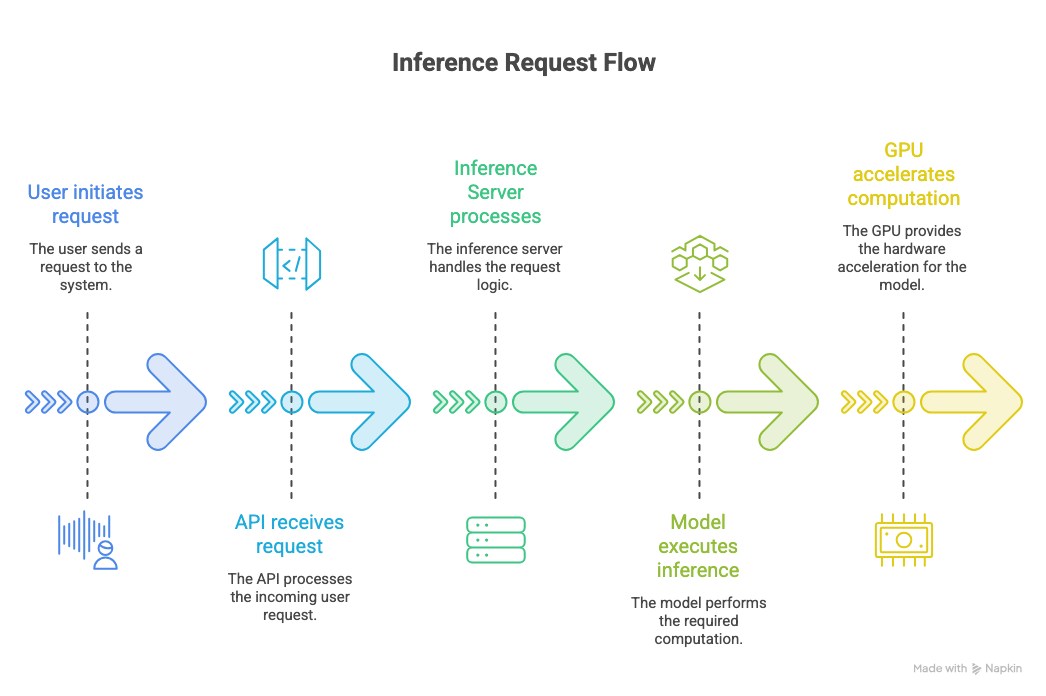
Quantization changes how the model is stored and processed.
For example:
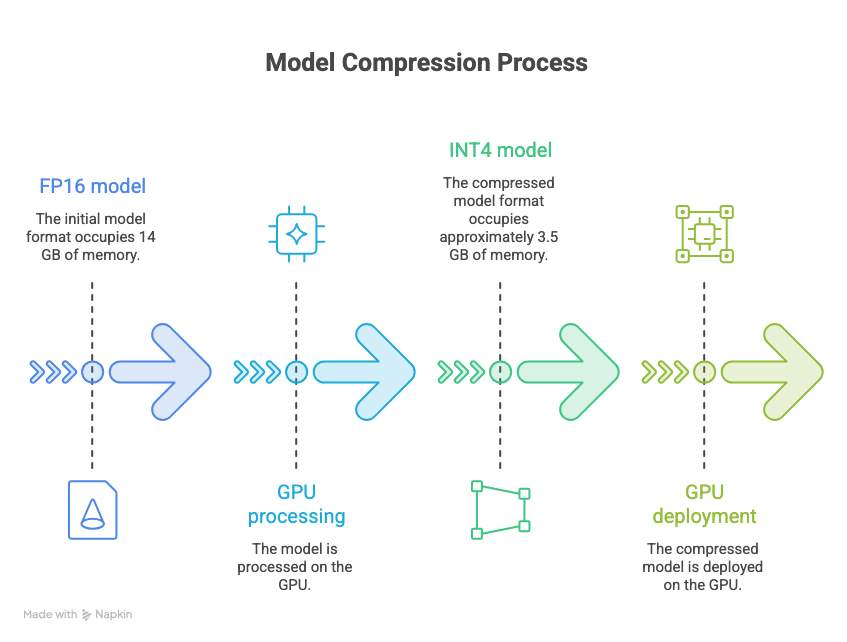
This can make a large difference when serving many requests
Quantization and KV Cache
Section titled “Quantization and KV Cache”This is an important connection to our previous topic.
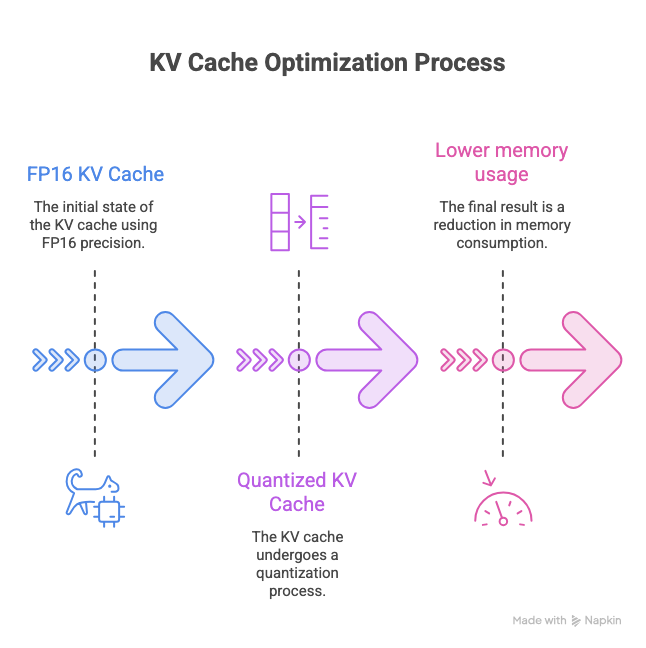
Quantization can also reduce memory used by the KV cache.
A Quantized KV Cache uses less GPU memory
What Should You Remember?
Section titled “What Should You Remember?”For an AI Engineer interview, remember these points:
Quantization
Section titled “Quantization”Reduce the number of bits used to represent model values.
Main goal
Section titled “Main goal”Reduce:
- Memory
- Memory bandwidth
- Cost
And potentially improve:
- Latency
- Throughput
Important formats
FP32FP16BF16INT8INT4Important approaches
PTQQATWeight-onlyWeight + activationImportant methods
GPTQAWQSmoothQuant