

Planning and Task Decomposition
Why Do Agents Need Planning?
Section titled “Why Do Agents Need Planning?”An AI agent can use tools, retrieve information, and respond to user requests. But a complex task often requires more than one action.
Consider this request:
Research three AI agent frameworks, compare their features, and save the results in a Markdown file.
The agent must perform several actions:
- Identify three frameworks to research.
- Find reliable sources for each framework.
- Extract the relevant information.
- Compare the features.
- Write the results to a Markdown file.
- Check that the file contains the required information.
Each action contributes to the final result. The agent must also decide which actions to perform first.
Planning is the process of deciding which actions are needed to achieve a goal and how to perform them.
Task decomposition is one part of planning. It breaks a complex goal into smaller tasks that are easier to execute and verify.
What Is Task Decomposition?
Section titled “What Is Task Decomposition?”Task decomposition converts a large task into smaller tasks.
A useful task should have a clear purpose and an observable result.
For example, consider the research request from the previous section.
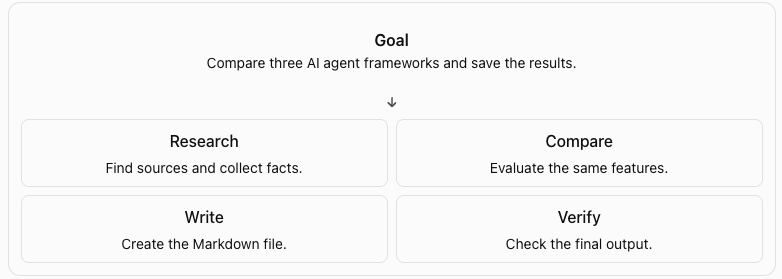
However, a list of tasks is not yet a complete execution plan. The agent must also know which tasks depend on other tasks and when a task is complete.
What Makes a Good Plan?
Section titled “What Makes a Good Plan?”A good plan contains enough information for the agent to execute each task and determine whether it succeeded.
A task can include:
- ID: A unique identifier.
- Description: The action to perform.
- Dependencies: Tasks that must finish first.
- Status: The current execution state.
- Expected result: The output required for success.
{ "id": "research_frameworks", "description": "Collect feature information for three frameworks", "depends_on": [], "status": "pending", "expected_result": "Research notes for three frameworks"}The agent can use this structure to track progress instead of relying only on conversation history.
A typical task can move through these states:
pending: The task has not started.in_progress: The task is being executed.completed: The expected result was produced and checked.failed: The task could not be completed.blocked: A required task or resource is unavailable.
The exact states depend on the application. The important point is that the agent must distinguish between a task that has been attempted and a task that has succeeded.
Planning vs. Execution
Section titled “Planning vs. Execution”Planning and execution are different operations.
Planning decides what needs to happen.
Execution performs the actions and checks their results.
For example, the plan may say:
Retrieve the official documentation for each framework.
Execution calls the search or browser tool to retrieve the documentation. The agent then checks whether the tool returned usable results.
If the tool fails, the agent should not mark the task as completed.
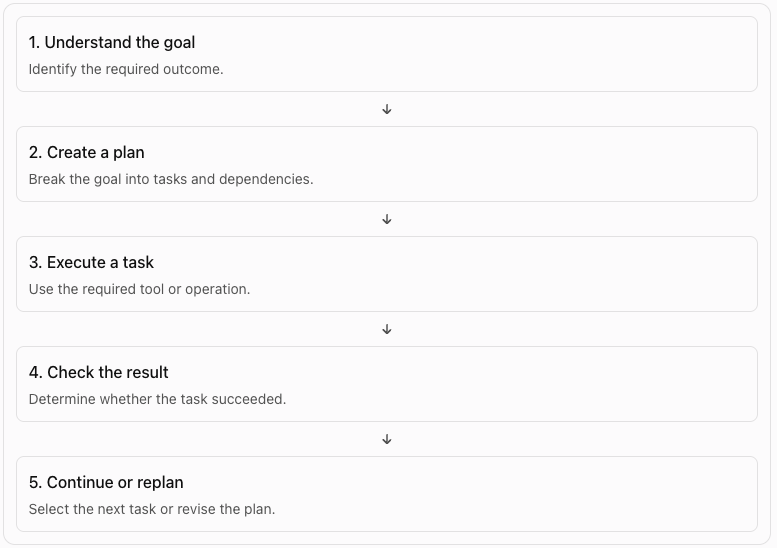
This cycle connects planning to the agent loop you studied earlier.
Static Plans vs. Dynamic Plans
Section titled “Static Plans vs. Dynamic Plans”An agent does not always need to create a new plan during execution.
There are two common approaches.
Static Planning
Section titled “Static Planning”The system creates the plan before execution and follows it.
This works well when the task is predictable and the steps are known.
For example, a deployment workflow may always run tests, build an artifact, and deploy it after approval.
Dynamic Planning
Section titled “Dynamic Planning”The agent can change the plan when it receives new information or encounters a failure.
For example, the agent may try to retrieve a documentation page. If the page is unavailable, it can search for another official source and continue.
Dynamic planning is useful for tasks with uncertainty. However, it also introduces risk. The agent may repeatedly change its plan, add unnecessary tasks, or move away from the original goal.
A practical system can combine both approaches: start with a plan, then allow controlled changes when needed.
Task Dependencies and Execution Order
Section titled “Task Dependencies and Execution Order”A plan can contain tasks that depend on other tasks.
An agent must know which tasks it can start and which tasks must wait.
The plan could contain these tasks:
Task 1: Find three frameworksTask 2: Collect information about each frameworkTask 3: Compare the frameworksTask 4: Write the comparison to a fileTask 5: Verify the fileThe agent must follow this order:
Find frameworks | vCollect information | vCompare frameworks | vWrite the file | vVerify the fileThis is a sequential plan. Each task must finish before the next task can start.
Represent dependencies
Section titled “Represent dependencies”A task can use a depends_on field to identify its dependencies.
tasks = [ { "id": "find_frameworks", "depends_on": [], "status": "pending" }, { "id": "collect_information", "depends_on": ["find_frameworks"], "status": "pending" }, { "id": "compare_frameworks", "depends_on": ["collect_information"], "status": "pending" }]A task is ready when all its dependencies are complete.
Independent tasks can run in parallel
Section titled “Independent tasks can run in parallel”Not every task needs to wait for another task.
Suppose the agent must collect information about three frameworks:
Find frameworks | +------> Research Framework A | +------> Research Framework B | +------> Research Framework C | v Compare results | v Write fileUse parallel execution only when the tasks are independent and the available resources support it.
Determine which task can run next
Section titled “Determine which task can run next”For every task:
- Read its dependencies.
- Check the status of each dependency.
- If all dependencies are complete, mark the task as ready.
- Otherwise, keep the task waiting.
What Happens When a Plan Fails?
Section titled “What Happens When a Plan Fails?”A plan describes what the agent expects to do. It does not guarantee that every task will succeed.
Suppose the agent must read a documentation page, but the URL returns a 404 error.
The agent has several options:
- Retry the request if the failure may be temporary.
- Search for the documentation at another URL.
- Use another reliable source.
- Mark the task as failed if it cannot continue.
The correct action depends on the failure.
The agent must not mark the research task as complete merely because it attempted to open the page.
If the agent has no research notes, it cannot produce a reliable comparison. It should not continue as if the research succeeded.
Replanning
Section titled “Replanning”Replanning means changing the current plan when new information makes the existing plan unsuitable.
Original plan:1. Open documentation URL2. Extract framework features3. Compare frameworks4. Write report
New information:The documentation URL is unavailable.
Updated plan:1. Search for the official documentation2. Extract framework features3. Compare frameworks4. Write report
The agent does not need to discard the entire plan. It can replace the failed task and preserve the tasks that are still valid.
This makes planning more useful in environments where tool calls, APIs, and external resources can fail.
When should an agent replan?
Section titled “When should an agent replan?”Replanning can be useful when:
- A required tool fails.
- A task produces unexpected output.
- A dependency cannot be completed.
- New information changes the next action.
- The current plan no longer meets the user’s goal.
However, replanning also has a cost.
An agent can waste time by repeatedly generating new plans without making progress. It can also drift away from the original goal.
Hands-on Exercise
Section titled “Hands-on Exercise”The example demonstrates:
- Break a goal into tasks.
- Track dependencies and task status.
- Execute tasks in the correct order.
- Verify task results before marking them complete.
- Replan when a task fails.